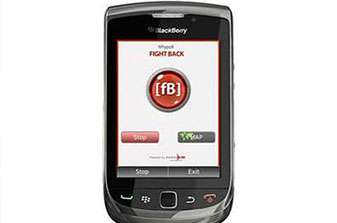
The app of this current week is FIGHTBACK.
This smartphone app was launched in December 2011 by a local NGO in New Delhi called WhyPoll, thanks to the increasing number of rapes and sexual assaults on the females in the city.
This app, at the press of a single key, sends an SOS message via a text message, email or Facebook to the pre-mentioned recipient. As soon as the SOS is activated the location of the sender can be traced via the GPS system.
Being the ‘lesser sex’, it is important for all of us to be concerned about our safety at all times. The main aim of this app is to identify the major hotspots where the women are most likely to be assaulted and hence provide more police protection at these places.
This app has been inspired by HarassMap, an initiative in Egypt to help the ladies.
So all you girls and ladies out there, go to www.fightbackmobile.com, follow the instructions to download the app and help yourself. As they say, “Prevention is definitely better than Cure”.
The process of using the app is as follows:
Android:
1. Press panic button, the center ([fB]) to send SOS.
2. Stop/Start button works as a toggle button to control GPS and sending your locations to
server at a particular interval.
3. By clicking on map button, you can see your current location on Google map.
4. By clicking on exit button or back key, you can exit from application.
5. By clicking on Home key, application can be sent in background.
6. An exclamation mark (!) will appear on the mobile application screen if SOS alert is raised
successfully. Click ë!í (exclamation mark) to cancel the alert if it has been sent by mistake.
7. if your application is not getting GPS location then please go to Settings->Location. Enable
check of “Use GPS satellites” if it is disabled.
Blackberry:
1. Press panic button, the center ([fB]) to send SOS.
2. Stop/Start button works as a toggle button to control GPS and sending your locations to
server at a particular interval.
3. By clicking on map button, you can see your current location on Google map.
4. By clicking on exit button or back key, you can exit from application.
5. By clicking on Red key Cancel), application can be sent in background.
6 An exclamation mark (!) will appear on the mobile application screen if SOS alert is raised
successfully . Click ë!í (Exclamation mark) to cancel the alert if it has been sent by mistake.
7. if your application is not getting GPS location then please go to Options->Advanced Options-
>GPS. If GPS Services is set to Location off then change it to Location On and save it. Again go
to GPS, Press menu key and select Refresh GPS and wait for Latitude and Longitude data.
Keep safe 🙂
If you have already used this app, let us know about your experience.
The recent India–AI Impact Summit 2026 demonstrated a defining global inflection point — the transition…
The Tech Panda looks at Indian Fintech expanding to Sri Lankan Bank while a Swiss…
By enabling secure, consent-based financial data sharing, the Account Aggregator framework is laying the groundwork…
There’s a quiet crisis in one of medicine’s most exciting fields. Cell therapy – the…
Lenovo and NVIDIA are pushing AI into its next phase, scaling real-time, production-ready systems that…
AI is changing how work gets done. It’s also changing how people feel about their…